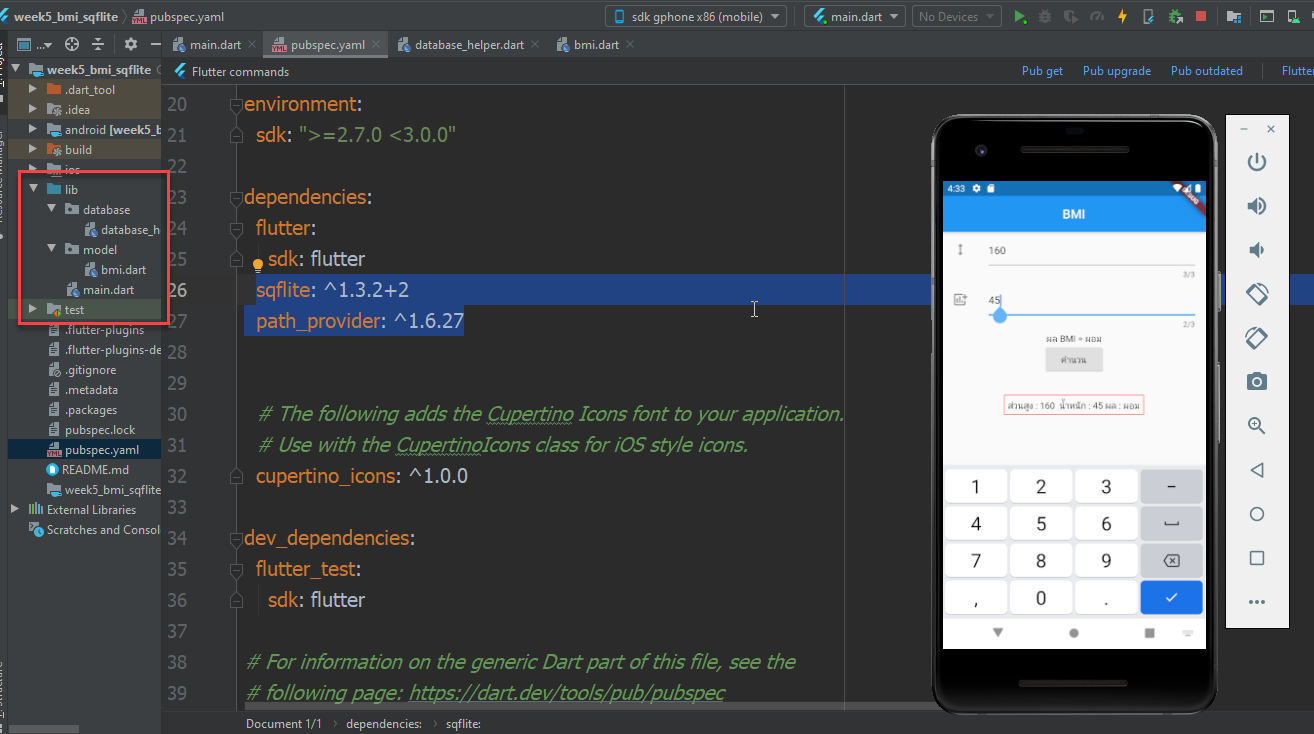


BMI sqflite จะมีไฟล์ที่เกี่ยวข้อง 3 ไฟล์ดังนี้
ต้องไปเพิ่ม package plugin ใน pubspec.yaml ก่อน ส่วนที่ sqflite: ^1.3.2+2 path_provider: ^1.6.27
name: week5_bmi_sqflite
description: A new Flutter application.

# The following line prevents the package from being accidentally published to
# pub.dev using `pub publish`. This is preferred for private packages.
publish_to: 'none' # Remove this line if you wish to publish to pub.dev

# The following defines the version and build number for your application.
# A version number is three numbers separated by dots, like 1.2.43
# followed by an optional build number separated by a +.
# Both the version and the builder number may be overridden in flutter
# build by specifying --build-name and --build-number, respectively.
# In Android, build-name is used as versionName while build-number used as versionCode.
# Read more about Android versioning at https://developer.android.com/studio/publish/versioning
# In iOS, build-name is used as CFBundleShortVersionString while build-number used as CFBundleVersion.
# Read more about iOS versioning at
# https://developer.apple.com/library/archive/documentation/General/Reference/InfoPlistKeyReference/Articles/CoreFoundationKeys.html
version: 1.0.0+1

environment:
  sdk: ">=2.7.0 <3.0.0"

dependencies:
  flutter:
    sdk: flutter
  sqflite: ^1.3.2+2
  path_provider: ^1.6.27


  # The following adds the Cupertino Icons font to your application.
  # Use with the CupertinoIcons class for iOS style icons.
  cupertino_icons: ^1.0.0

dev_dependencies:
  flutter_test:
    sdk: flutter

# For information on the generic Dart part of this file, see the
# following page: https://dart.dev/tools/pub/pubspec

# The following section is specific to Flutter.
flutter:

  # The following line ensures that the Material Icons font is
  # included with your application, so that you can use the icons in
  # the material Icons class.
  uses-material-design: true

  # To add assets to your application, add an assets section, like this:
  # assets:
  #   - images/a_dot_burr.jpeg
  #   - images/a_dot_ham.jpeg

  # An image asset can refer to one or more resolution-specific "variants", see
  # https://flutter.dev/assets-and-images/#resolution-aware.

  # For details regarding adding assets from package dependencies, see
  # https://flutter.dev/assets-and-images/#from-packages

  # To add custom fonts to your application, add a fonts section here,
  # in this "flutter" section. Each entry in this list should have a
  # "family" key with the font family name, and a "fonts" key with a
  # list giving the asset and other descriptors for the font. For
  # example:
  # fonts:
  #   - family: Schyler
  #     fonts:
  #       - asset: fonts/Schyler-Regular.ttf
  #       - asset: fonts/Schyler-Italic.ttf
  #         style: italic
  #   - family: Trajan Pro
  #     fonts:
  #       - asset: fonts/TrajanPro.ttf
  #       - asset: fonts/TrajanPro_Bold.ttf
  #         weight: 700
  #
  # For details regarding fonts from package dependencies,
  # see https://flutter.dev/custom-fonts/#from-packages
1.ไปที่ folder lib คลิกขวา new แล้วเลือก package ตั้งชื่อ model แล้วหลังจากนั้นก็ให้คลิกที่ Folder model ทำการ new dart file ตั้งชื่อ bmi.dart
class Bmi{
     int id;
     String _weight;
     String _height;
     String _describe;
     Bmi(this._height,this._weight,this._describe);
     Bmi.map(dynamic obj){
       this._weight = obj["weight"];
       this._height = obj["height"];
       this._describe = obj["describe"];
     }

     String get weight => _weight;

     String get height => _height;

     String get describe => _describe;

     Map<String, dynamic> toMap() {
       var map = new Map<String, dynamic>();

       map["weight"] = _weight;
       map["height"] = _height;
       map["describe"] = _describe;

       return map;
     }

     void setBmiId(int id) {
       this.id = id;
     }

}
2. ไปที่ lib คลิกขวาสร้าง package ชื่อ database แล้วคลิกขวาที่ folder นี้เลือก new file สร้าง database_herper.dart
import 'dart:io' as io;

import 'package:path/path.dart';
import 'package:sqflite/sqflite.dart';
import 'package:path_provider/path_provider.dart';
import 'package:week5_bmi_sqflite/model/bmi.dart';

class DatabaseHelper{
  static final DatabaseHelper _instance = new DatabaseHelper.internal();

  factory DatabaseHelper() => _instance;

  static Database _db;

  Future<Database> get db async {
    if (_db != null) return _db;
    _db = await initDb();
    return _db;
  }

  DatabaseHelper.internal();

  initDb() async {
    io.Directory documentsDirectory = await getApplicationDocumentsDirectory();
    String path = join(documentsDirectory.path, "main.db");
    var theDb = await openDatabase(path, version: 1, onCreate: _onCreate);
    return theDb;
  }


  // จากด้านบนตรวจสอบแล้วไม่พบก็ให้สร้าง db สร้าง table
  Future _onCreate(Database db, int version) async {
    await db.execute('''
          CREATE TABLE bmi(
           id INTEGER PRIMARY KEY,
            height TEXT,
            weight TEXT,
            describe TEXT
          )
          ''');
    print("----Table Created");
  }

  //บันทึกค่าใน db
  Future<int> saveBmi(Bmi bmi) async {
    var dbClient = await db;
    int res = await dbClient.insert("bmi", bmi.toMap());
    return res;
  }

  //เรียกข้อมูลใน db
  Future<List<Bmi>> getBmi() async {
    var dbClient = await db;
    List<Map> list = await dbClient.rawQuery('SELECT * FROM bmi');
    List<Bmi> bmi = new List();
    for (int i = 0; i < list.length; i++) {
      var resBMI =
      new Bmi(list[i]["height"], list[i]["weight"], list[i]["describe"]);
      //เก็บค่า PK เพื่อเอาไว้ลบ
      resBMI.setBmiId(list[i]["id"]);
      //ทำการบันทึกไว้ใน bmi model เพื่อไปเรียกใช้
      bmi.add(resBMI);
    }
    print(bmi.length);
    return bmi;
  }
//ลบข้อมูลใน db
  Future<int> deleteBmi(Bmi bmi) async {
    var dbClient = await db;

    int res =
    await dbClient.rawDelete('DELETE FROM bmi WHERE id = ?', [bmi.id]);
    return res;
  }

  //บันทึกข้อมูลใน db
  Future<bool> updateBmi(Bmi bmi) async {
    var dbClient = await db;
    int res =   await dbClient.update("bmi", bmi.toMap(),
        where: "id = ?", whereArgs: <int>[bmi.id]);
    return res > 0 ? true : false;
  }


}
3. ในหน้า main.dart เรียกใช้งาน db และ model ที่สร้าง
import 'package:flutter/material.dart';
import 'package:week5_bmi_sqflite/model/bmi.dart';

//import 'database/database_helper.dart';
import 'package:week5_bmi_sqflite/database/database_helper.dart';
import 'package:week5_bmi_sqflite/model/bmi.dart';

void main() {
  runApp(MyApp());
}

class MyApp extends StatelessWidget {
  // This widget is the root of your application.
  @override
  Widget build(BuildContext context) {
    return MaterialApp(
      title: 'Flutter Demo',
      theme: ThemeData(

        primarySwatch: Colors.blue,

        visualDensity: VisualDensity.adaptivePlatformDensity,
      ),
      home: MyHomePage(title: 'Flutter Demo Home Page'),
    );
  }
}

class MyHomePage extends StatefulWidget {
  MyHomePage({Key key, this.title}) : super(key: key);


  final String title;

  @override
  _MyHomePageState createState() => _MyHomePageState();
}

class _MyHomePageState extends State<MyHomePage> {
  TextEditingController txtHight=TextEditingController();
  TextEditingController txtWidth=TextEditingController();
  String _result="0";
  int _counter = 0;
// ประกาศ bmi model
  Bmi bmi;
  List<Bmi> country;

  void _incrementCounter() {
    setState(() {

      _counter++;
    });
  }

  @override
  Widget build(BuildContext context) {

    return Scaffold(
      appBar: AppBar(
          title: Center(child:Text('BMI'))

      ),
      body: Center(
        child: Column(
          children: <Widget>[
            ListTile(
              leading: Icon(Icons.height),
              title:  TextField(
                controller: txtHight,
                maxLength: 3,
                keyboardType: TextInputType.number,
                decoration: InputDecoration(
                    hintText: 'ระบุส่วนสูง (cm)'
                ),
              ),
            ),
            ListTile(
              leading: Icon(Icons.add_chart),
              title: TextField(
                controller: txtWidth,
                maxLength: 3,
                keyboardType: TextInputType.number,
                decoration: InputDecoration(
                    hintText: 'ระบุน้ำหนัก (kg)'
                ),
              ),
            ),
            Text('ผล BMI = $_result'),
            RaisedButton(
              onPressed: (){
                //print('ส่วนสูง:'+txtHight.text+', น้ำหนัก :'+txtWidth.text);
                setState(() {
                  //Body Mass Index (BMI) มีสูตรการคำนวณ = น้ำหนักตัว[Kg] / (ส่วนสูง[m] ยกกำลังสอง)
                  var _heightM=double.parse(txtHight.text)/100;//ประกาศตัวแปร _heightM มารับค่าส่วนสูง cm แปลงเป็น m
                  var _bmi=double.parse(txtWidth.text)/(_heightM*_heightM);
                  _result=_bmi.toStringAsFixed(3);
                  if(_bmi>=30){
                    _result="อ้วนมาก";
                  }
                  else if(_bmi>=25){
                    _result="อ้วน";
                  }
                  else if(_bmi>=23){
                    _result="น้ำหนักเกิน";
                  }
                  else if(_bmi>=18.6){
                    _result="น้ำหนักปกติ เหมาะสม";
                  }
                  else
                  {
                    _result="ผอม";
                  }
                  //print(_bmi);

                  //สร้าง popup แสดงผลลัพธ์
                  showDialog(
                      context: context,
                      builder: (BuildContext context){
                        // return Text('$_result');
                        //เรียก dialog ที่เป็น widget ของ Scaffold จะทำให้สวยงาม
                        return AlertDialog(
                          title: Text('ผล BMI'),
                          content: Container(
                            width:300,
                            height:100,
                            child: Column(
                              children: <Widget>[
                                //Text('มีค่า BMI=$_bmi'),
                                Text('มีค่า BMI=${_bmi.toStringAsFixed(3)}'),
                                Text('$_result'),
                              ],
                            ),
                          ),
                          actions: <Widget>[
                            ButtonBar(
                              children: <Widget>[
                                FlatButton(
                                  child: Text('บันทึก'),
                                  color: Colors.blue,
                                  onPressed: () {
                                    addRecord(false);
                                    displayRecord();
                                    _query();
                                    Navigator.pop(context);
                                    // To do
                                  },
                                ),
                                FlatButton(
                                  child: Text('ปิด'),
                                  color: Colors.blue,
                                  onPressed: () {
                                    Navigator.pop(context);
                                    // To do
                                  },
                                ),
                              ],
                            ),

                          ],
                        );
                      }
                  );

                });

              },
              child: Text('คำนวน'),
            ),
            //display bmi form db

            Container(
              margin: EdgeInsets.all(32),
              padding: EdgeInsets.all(5),
              decoration: BoxDecoration(border: Border.all(color: Colors.red)),
              child: Column(
                children: <Widget>[
                  Container(
                    child: new FutureBuilder<List<Bmi>>(
                      future: getBmi(),
                      builder: (context,snapshot){
                        if(snapshot.hasData){
                          return new Text("ส่วนสูง : ${snapshot.data[snapshot.data.length-1].height} "+
                              " น้ำหนัก : ${snapshot.data[snapshot.data.length-1].weight}"+
                              " ผล : ${snapshot.data[snapshot.data.length-1].describe}"
                          );

                        }
                        else if(snapshot.hasError){
                          return new Text("${snapshot.error}");
                        }
                        else{
                          //return loading action
                          return new Container(alignment: AlignmentDirectional.center,
                            child: new CircularProgressIndicator(),
                          );
                        }


                      },
                    ),
                  ),

                ],

              ),

            ),
          ],
        ),
      ),

    );
  }

  Future addRecord(bool isEdit) async {
    var db = new DatabaseHelper();
    var bmi = new Bmi(txtHight.text,txtWidth.text,_result);
    if (isEdit) {
      bmi.setBmiId(this.bmi.id);
      await db.updateBmi(bmi);
    } else {
      print("Save");
      await db.saveBmi(bmi);
    }
  }

  void _query() async {
    var db = new DatabaseHelper();
    // final allRows = await db.getBmi();
    List<Bmi> list =await db.getBmi();
    for (int i = 0; i < list.length; i++) {
      print(list[i].weight+list[i].height+list[i].describe);
    }
    // allRows.forEach((row) => print(row));
  }

  Future<List<Bmi>> getBmi() {
    var db = new DatabaseHelper();
    return db.getBmi();
  }


  displayRecord() {
    setState(() {});
  }

}