Download เอกสารประกอบการสอน database NF
-
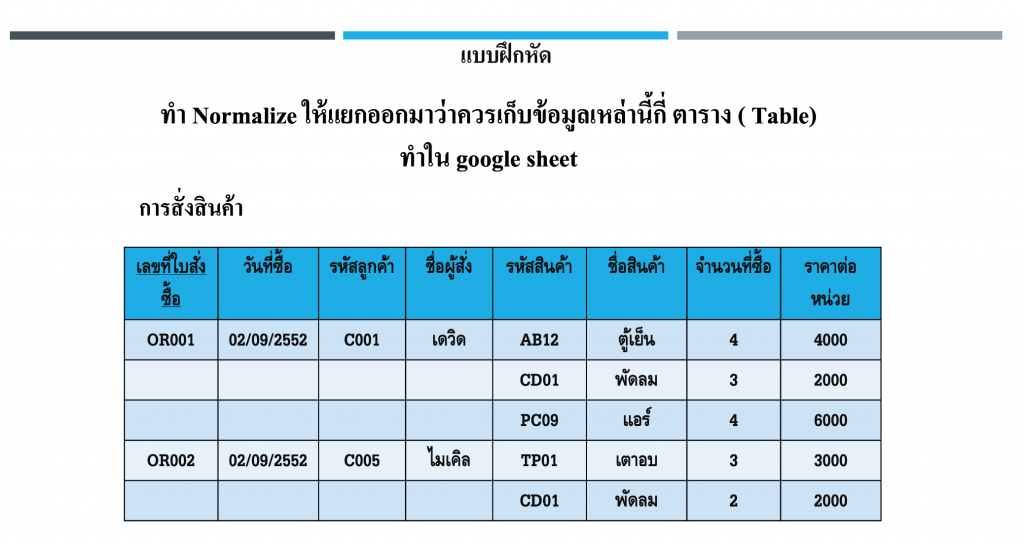
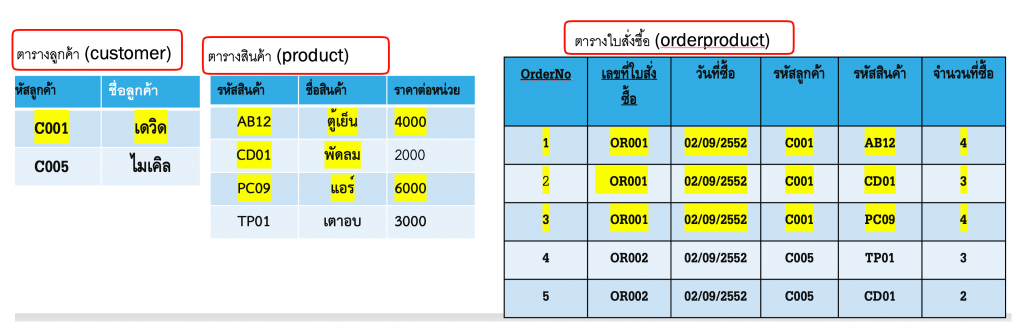
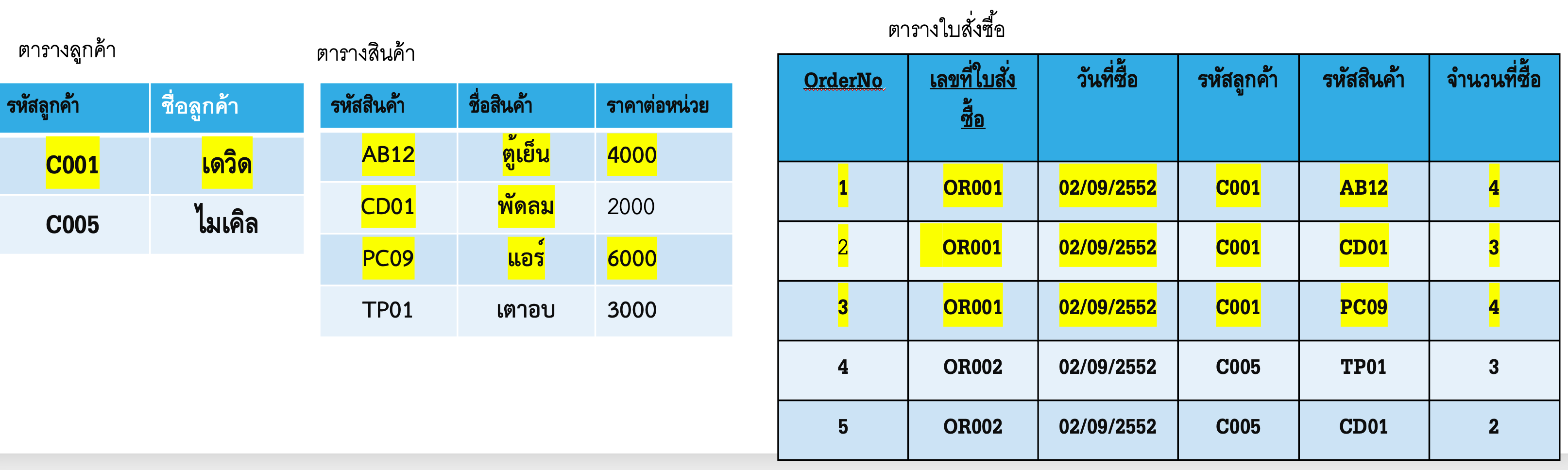
- ให้ทำการเขียน NF จากภาพต่อไปนี้โดยแยกว่าควรมี table หรือตารางในการเก็บข้อมูลกี่ตาราง
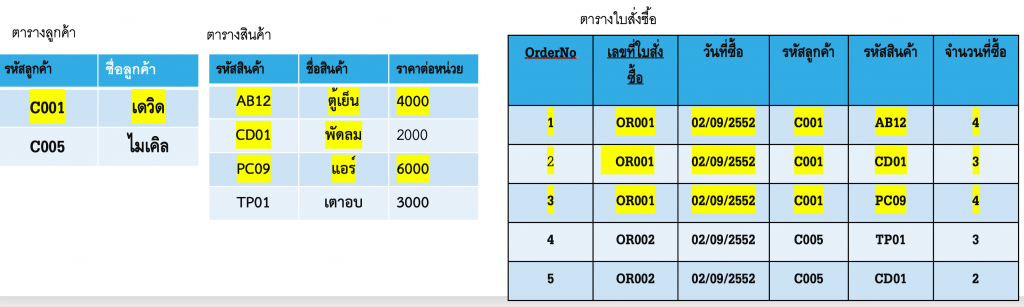
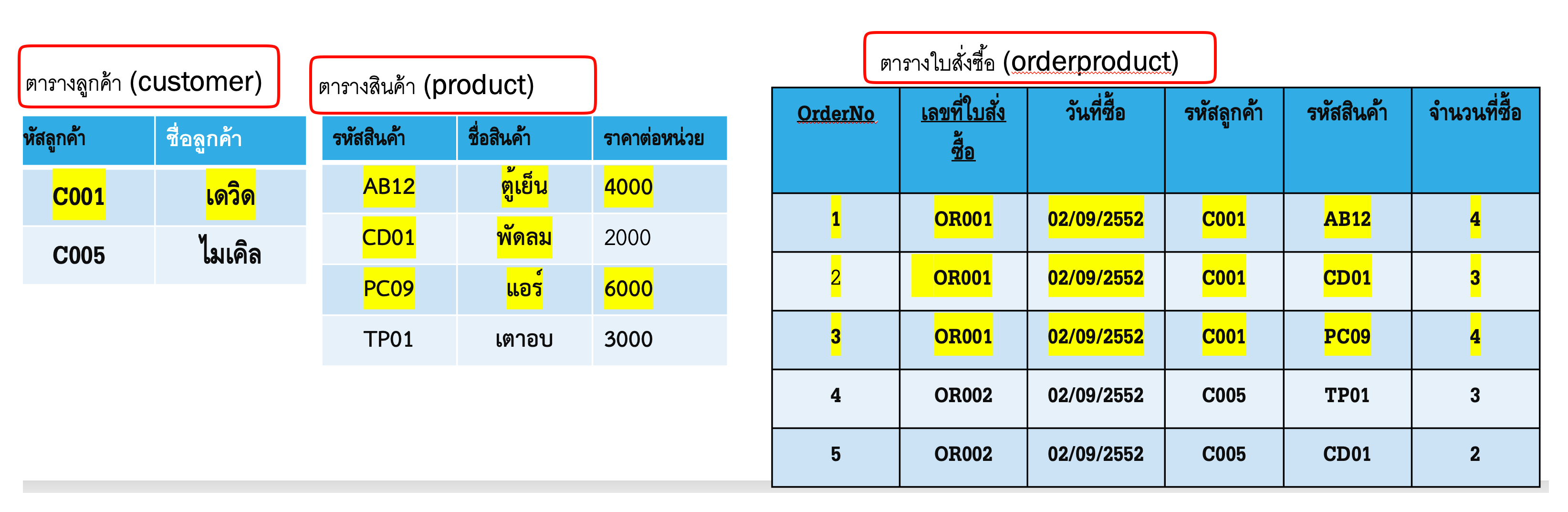
- จะทำการ NF ได้ 3 ตารางดังนี้
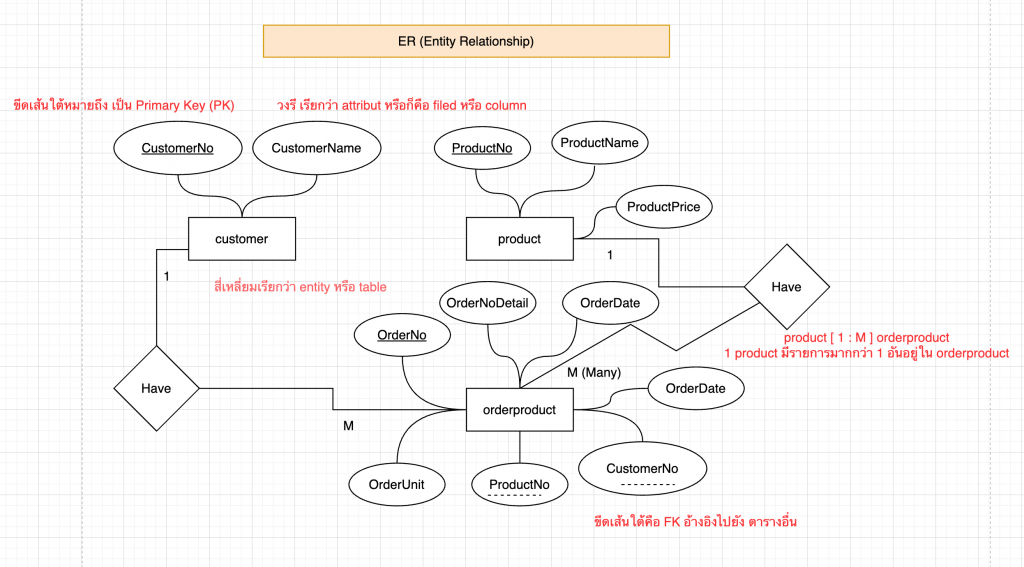
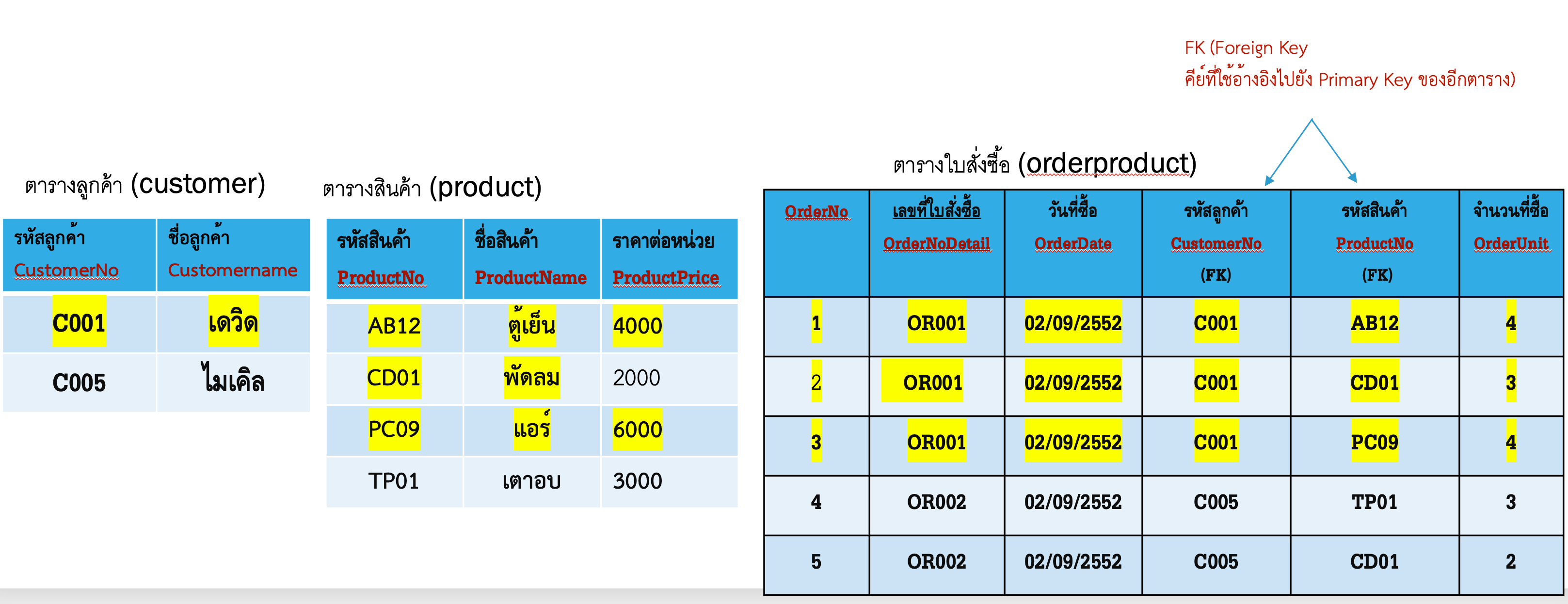
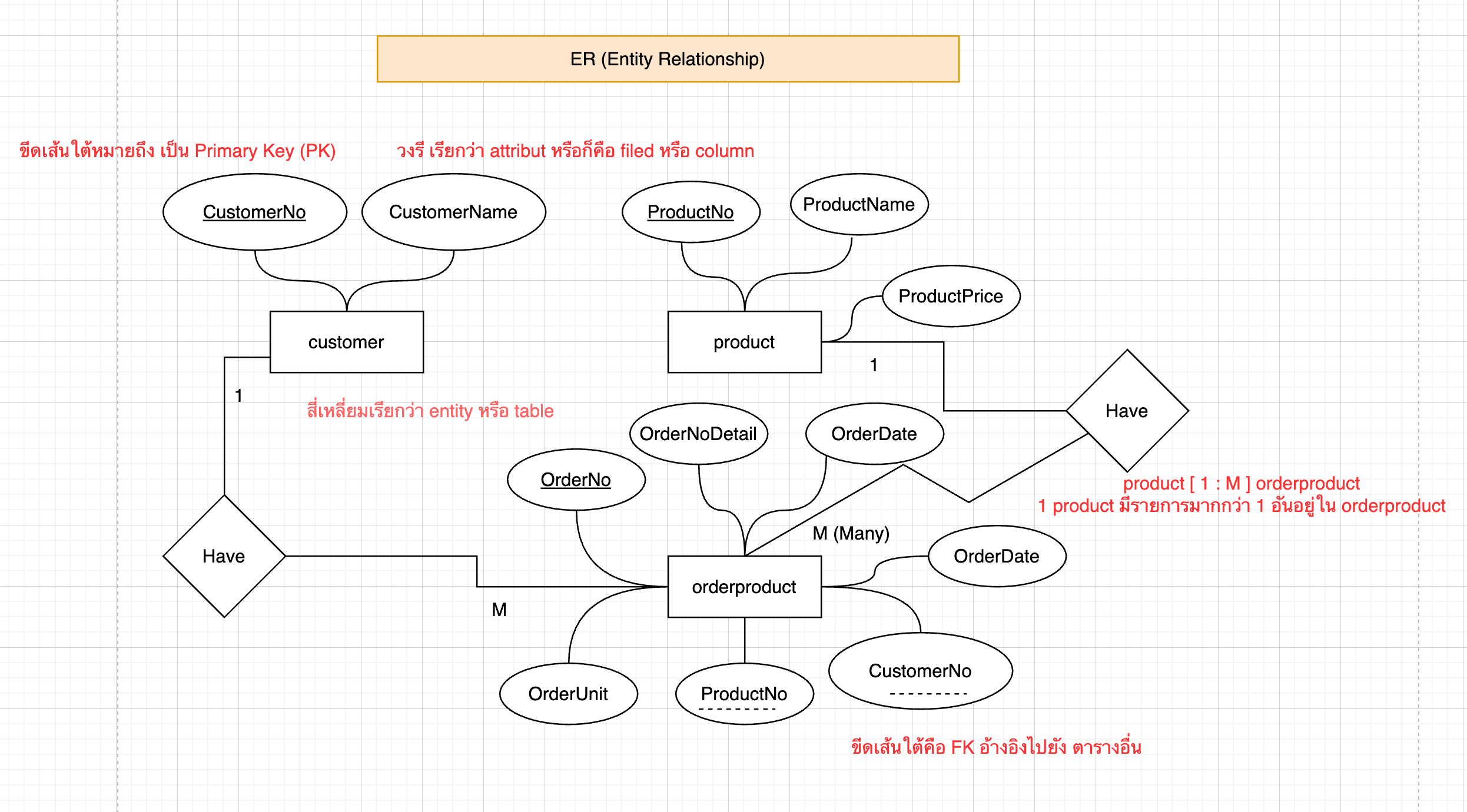
- ทำ ER Diagram เพื่อรู้ว่า table และ field ที่จะเก็บข้อมูลมีอะไรบ้าง
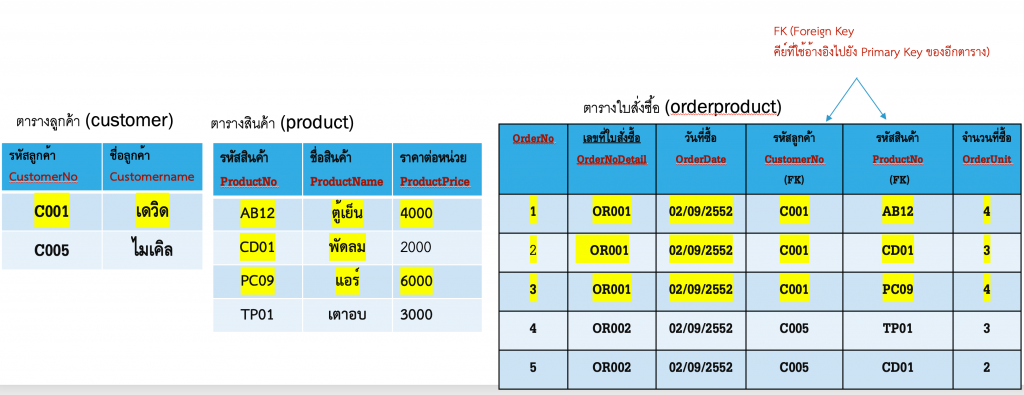
step 1 ตั้งชื่อตารางเป็น ภาษาอังกฤษ
step 2 ตั้งชื่อ column หรือ filed เป็นภาษาอังกฤษ ลักษณะการตั้งแบบเดียวกับการตั้วชื่อตัวแปร
 step 3 สร้าง ER แบบง่าย
- ทำโปรแกรม บันทึกผลการออกกำลังกาย เช่นเดินกี่กิโล วิ่งกี่กิโล มีเก็บระยะทาง มีเก็บเวลาที่ใช้ มีเก็บวันที่ออก มีเก็บน้ำหนักปัจจุบันของเราได้
- วิเคราะห์สิ่งที่จะให้เก็บข้อมูลในฐานข้อมูลก็จะมีดังนี้
1) ประเภทการออกกำลังกาย เช่น วิ่ง เดิน ว่ายน้ำ
2) ระยะทางที่ออก หน่วยเป็นเมตร
3) เวลาที่ใช้หน่วยเป็นนาที
4) วันที่ออกกำลังกาย
5) เก็บน้ำหนักปัจจุบัน เพื่ออนาคตไว้ดูเปรียบเทียบผลการออกกำลังกาย - หลังจากนั้นให้ใช้ ChatGPT สร้าง GUI ตามด้านบนจะได้โค้ดดังนี้
import tkinter as tk
from tkinter import ttk, messagebox
import sqlite3
from datetime import date

# =========================
# Database
# =========================
conn = sqlite3.connect("exercise.db")
cursor = conn.cursor()

cursor.execute("""
CREATE TABLE IF NOT EXISTS exercise_log (
    id INTEGER PRIMARY KEY AUTOINCREMENT,
    exercise_type TEXT,
    distance_m REAL,
    duration_min REAL,
    exercise_date TEXT,
    weight REAL
)
""")
conn.commit()

# =========================
# GUI
# =========================
app = tk.Tk()
app.title("โปรแกรมบันทึกผลการออกกำลังกาย")
app.geometry("700x500")

# =========================
# Functions
# =========================
def save_data():
    try:
        cursor.execute("""
            INSERT INTO exercise_log
            (exercise_type, distance_m, duration_min, exercise_date, weight)
            VALUES (?, ?, ?, ?, ?)
        """, (
            exercise_type.get(),
            float(distance_entry.get()),
            float(duration_entry.get()),
            date_entry.get(),
            float(weight_entry.get())
        ))
        conn.commit()
        messagebox.showinfo("สำเร็จ", "บันทึกข้อมูลเรียบร้อย")
        load_data()
    except:
        messagebox.showerror("ผิดพลาด", "กรุณากรอกข้อมูลให้ครบและถูกต้อง")

def load_data():
    for row in tree.get_children():
        tree.delete(row)

    cursor.execute("SELECT * FROM exercise_log")
    for r in cursor.fetchall():
        tree.insert("", tk.END, values=r)

# =========================
# Input Form
# =========================
tk.Label(app, text="ประเภทการออกกำลังกาย").grid(row=0, column=0, padx=10, pady=5, sticky="e")
exercise_type = ttk.Combobox(app, values=["เดิน", "วิ่ง", "ว่ายน้ำ"], width=18)
exercise_type.grid(row=0, column=1)
exercise_type.current(0)

tk.Label(app, text="ระยะทาง (เมตร)").grid(row=1, column=0, sticky="e")
distance_entry = tk.Entry(app)
distance_entry.grid(row=1, column=1)

tk.Label(app, text="เวลา (นาที)").grid(row=2, column=0, sticky="e")
duration_entry = tk.Entry(app)
duration_entry.grid(row=2, column=1)

tk.Label(app, text="วันที่ (YYYY-MM-DD)").grid(row=3, column=0, sticky="e")
date_entry = tk.Entry(app)
date_entry.grid(row=3, column=1)
date_entry.insert(0, date.today().isoformat())

tk.Label(app, text="น้ำหนัก (kg)").grid(row=4, column=0, sticky="e")
weight_entry = tk.Entry(app)
weight_entry.grid(row=4, column=1)

tk.Button(app, text="บันทึกข้อมูล", command=save_data)\
    .grid(row=5, column=1, pady=10, sticky="w")

# =========================
# Table (History)
# =========================
columns = ("id", "type", "distance", "time", "date", "weight")
tree = ttk.Treeview(app, columns=columns, show="headings")

tree.heading("id", text="ID")
tree.heading("type", text="ประเภท")
tree.heading("distance", text="ระยะทาง (m)")
tree.heading("time", text="เวลา (min)")
tree.heading("date", text="วันที่")
tree.heading("weight", text="น้ำหนัก (kg)")

tree.column("id", width=40, anchor="center")
tree.column("type", width=80, anchor="center")
tree.column("distance", width=100, anchor="center")
tree.column("time", width=100, anchor="center")
tree.column("date", width=100, anchor="center")
tree.column("weight", width=100, anchor="center")

tree.grid(row=6, column=0, columnspan=3, padx=10, pady=10, sticky="nsew")

load_data()

# =========================
# Run
# =========================
app.mainloop()
conn.close()
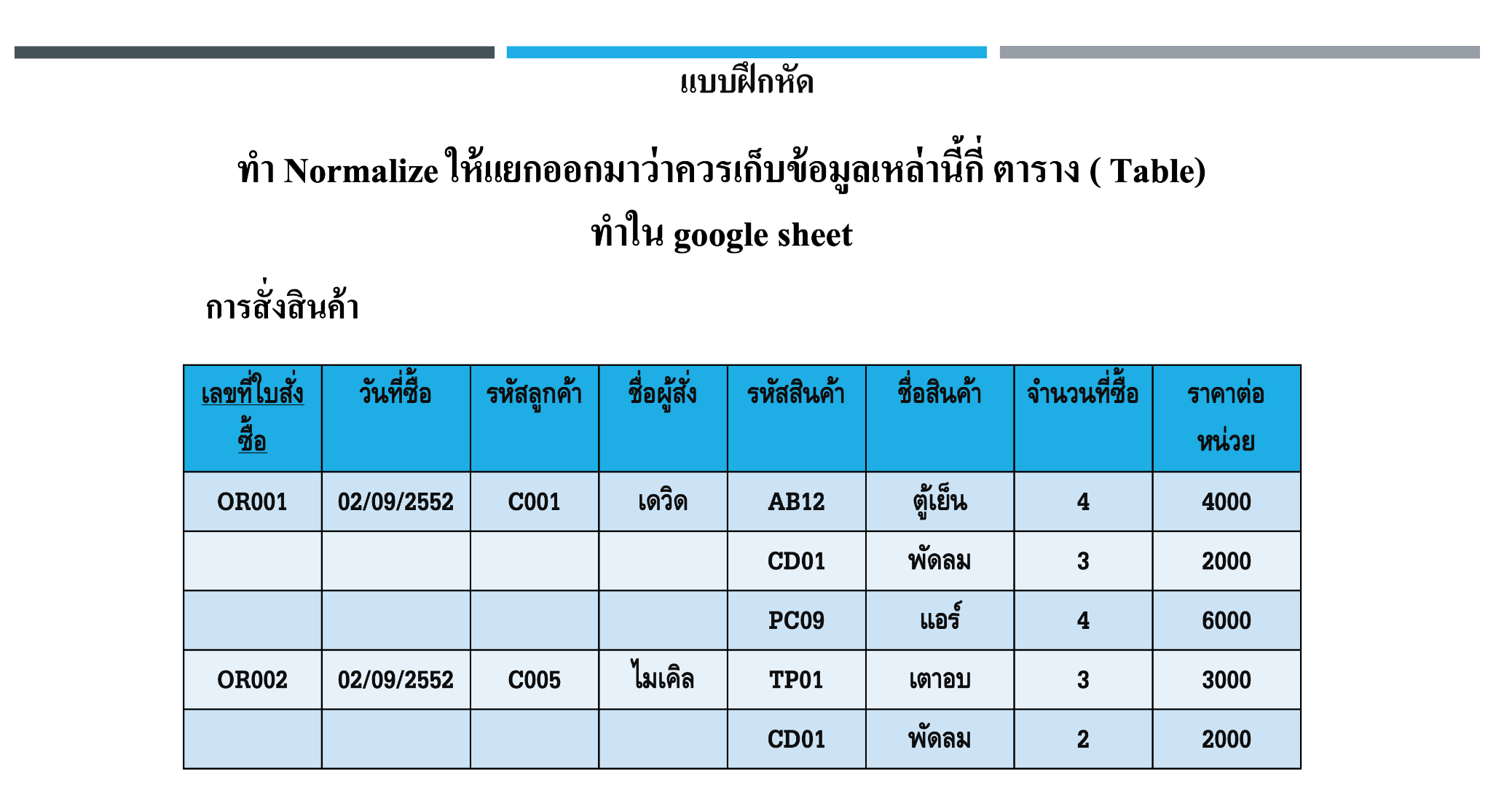
- ให้ทำการเขียน NF จากภาพต่อไปนี้โดยแยกว่าควรมี table หรือตารางในการเก็บข้อมูลกี่ตาราง
7. ถ้าต้องการเพิ่มปุ่มลบจะมีโค้ดทั้งหมดดังนี้
import tkinter as tk
from tkinter import ttk, messagebox
import sqlite3
from datetime import date

# =========================
# Database
# =========================
conn = sqlite3.connect("exercise.db")
cursor = conn.cursor()

cursor.execute("""
CREATE TABLE IF NOT EXISTS exercise_log (
    id INTEGER PRIMARY KEY AUTOINCREMENT,
    exercise_type TEXT,
    distance_m REAL,
    duration_min REAL,
    exercise_date TEXT,
    weight REAL
)
""")
conn.commit()

# =========================
# GUI
# =========================
app = tk.Tk()
app.title("โปรแกรมบันทึกผลการออกกำลังกาย")
app.geometry("750x500")

# =========================
# Functions
# =========================
def save_data():
    try:
        cursor.execute("""
            INSERT INTO exercise_log
            (exercise_type, distance_m, duration_min, exercise_date, weight)
            VALUES (?, ?, ?, ?, ?)
        """, (
            exercise_type.get(),
            float(distance_entry.get()),
            float(duration_entry.get()),
            date_entry.get(),
            float(weight_entry.get())
        ))
        conn.commit()
        messagebox.showinfo("สำเร็จ", "บันทึกข้อมูลเรียบร้อย")
        clear_form()
        load_data()
    except:
        messagebox.showerror("ผิดพลาด", "กรุณากรอกข้อมูลให้ครบและถูกต้อง")

def load_data():
    for row in tree.get_children():
        tree.delete(row)

    cursor.execute("SELECT * FROM exercise_log")
    for r in cursor.fetchall():
        tree.insert("", tk.END, values=r)

def delete_data():
    selected = tree.selection()
    if not selected:
        messagebox.showwarning("แจ้งเตือน", "กรุณาเลือกข้อมูลที่ต้องการลบ")
        return

    record = tree.item(selected[0])["values"]
    record_id = record[0]

    if messagebox.askyesno("ยืนยัน", f"ต้องการลบข้อมูล ID {record_id} ใช่หรือไม่"):
        cursor.execute("DELETE FROM exercise_log WHERE id = ?", (record_id,))
        conn.commit()
        load_data()
        messagebox.showinfo("สำเร็จ", "ลบข้อมูลเรียบร้อย")

def clear_form():
    distance_entry.delete(0, tk.END)
    duration_entry.delete(0, tk.END)
    weight_entry.delete(0, tk.END)
    date_entry.delete(0, tk.END)
    date_entry.insert(0, date.today().isoformat())

# =========================
# Input Form
# =========================
tk.Label(app, text="ประเภทการออกกำลังกาย").grid(row=0, column=0, padx=10, pady=5, sticky="e")
exercise_type = ttk.Combobox(app, values=["เดิน", "วิ่ง", "ว่ายน้ำ"], width=18)
exercise_type.grid(row=0, column=1, sticky="w")
exercise_type.current(0)

tk.Label(app, text="ระยะทาง (เมตร)").grid(row=1, column=0, sticky="e")
distance_entry = tk.Entry(app)
distance_entry.grid(row=1, column=1, sticky="w")

tk.Label(app, text="เวลา (นาที)").grid(row=2, column=0, sticky="e")
duration_entry = tk.Entry(app)
duration_entry.grid(row=2, column=1, sticky="w")

tk.Label(app, text="วันที่ (YYYY-MM-DD)").grid(row=3, column=0, sticky="e")
date_entry = tk.Entry(app)
date_entry.grid(row=3, column=1, sticky="w")
date_entry.insert(0, date.today().isoformat())

tk.Label(app, text="น้ำหนัก (kg)").grid(row=4, column=0, sticky="e")
weight_entry = tk.Entry(app)
weight_entry.grid(row=4, column=1, sticky="w")

tk.Button(app, text="บันทึกข้อมูล", command=save_data)\
    .grid(row=5, column=1, pady=10, sticky="w")

tk.Button(app, text="ลบข้อมูล", command=delete_data, fg="red")\
    .grid(row=5, column=1, padx=100, pady=10, sticky="w")

# =========================
# Table (History)
# =========================
columns = ("id", "type", "distance", "time", "date", "weight")
tree = ttk.Treeview(app, columns=columns, show="headings")

tree.heading("id", text="ID")
tree.heading("type", text="ประเภท")
tree.heading("distance", text="ระยะทาง (m)")
tree.heading("time", text="เวลา (min)")
tree.heading("date", text="วันที่")
tree.heading("weight", text="น้ำหนัก (kg)")

tree.column("id", width=40, anchor="center")
tree.column("type", width=80, anchor="center")
tree.column("distance", width=100, anchor="center")
tree.column("time", width=100, anchor="center")
tree.column("date", width=100, anchor="center")
tree.column("weight", width=100, anchor="center")

tree.grid(row=6, column=0, columnspan=3, padx=10, pady=10, sticky="nsew")

load_data()

# =========================
# Run
# =========================
app.mainloop()
conn.close()